
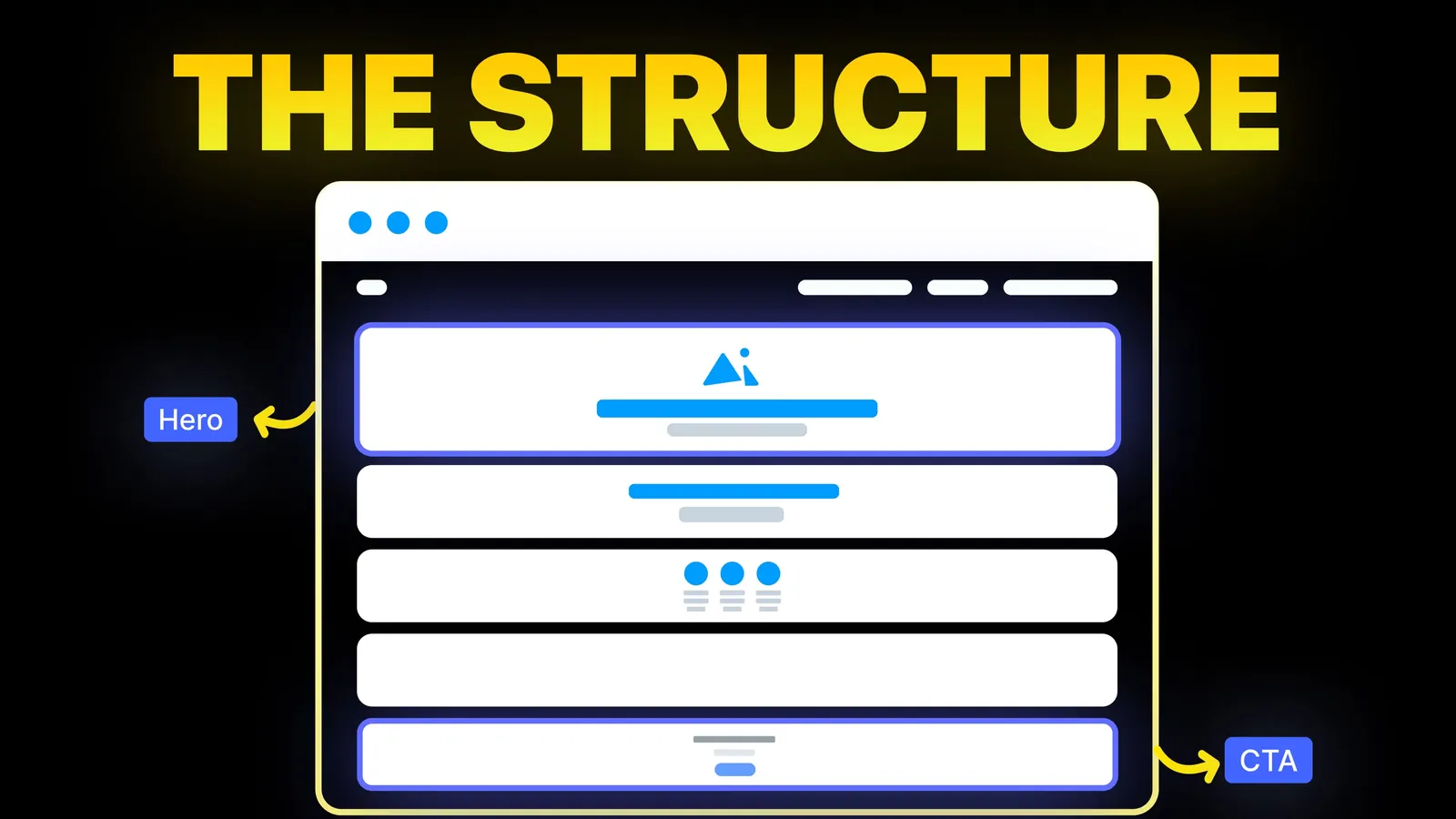
How to Turn Your Website Into a High-Converting Sales Machine
The structure behind a website that sells: the five decisions that carry conversion, the homepage section order, and how to rebuild without losing traffic.
Web Design
Search for this and you get galleries of dazzling sites and libraries to build them. Few results tell a business owner which motion is worth having. This guide sorts animations by what they do for a visitor, then sets a motion budget from Google's, the W3C's and MDN's own pages, all read on 7 November 2026.

prefers-reduced-motion: reduce is the recommended response, since scaling and panning can trigger discomfort for people with vestibular disorders.For a business site, keep animations that explain or reward: a button that reacts when pressed, a menu that opens smoothly, a section that fades in once as it arrives, a single moving element in the hero. Cut animations that delay content, move on their own forever, or run on every scroll. Build the motion with transform and opacity, offer a calm version to anyone who has turned reduced motion on, and test the page's speed on a mid-range phone, not on your own laptop. For motion tied to scrolling, see our scroll animation guide.
Who is writing: Amariq designs and builds websites, including motion on Webflow, Framer and custom builds. We haven't run a controlled test of the effects named here. The rules below come from the standards bodies and platform makers linked in the text.
On 7 November 2026 the first page of Google (US, English) for "website animations" was a mix of showcases and tools: Webflow's and Awwwards' animation galleries, a Dribbble tag, the GSAP, Motion and LottieFiles sites, Landing Love's collection of 2,256 sites, a Wick Editor page, and two how-to lists from SVGator (31 examples, 24 February 2026) and Wix. Google's own AI summary at the top listed types of animation (scroll-linked, microinteractions, mask reveals, 3D effects, animated icons) and three principles: purpose over flash, performance and accessibility.
Those three principles are the useful part, and the results mostly stop short of them. A gallery shows what is possible. A library shows how. Neither tells a small business whether a parallax hero will cost it enquiries on a phone. That is the gap, and the sections below fill it from sources that don't sell a tool.
| Type | What it does | Risk | Verdict for a business site |
|---|---|---|---|
| Hover and press feedback | Shows an element is clickable | Very low | Keep |
| Menu and accordion motion | Shows what opened or closed | Low | Keep, keep it short |
| Page or section fade-in on scroll | Draws the eye as content arrives | Medium if overused | Use once per section, not on every element |
| Hero motion (video, loop or a moving element) | Sets a mood | Can delay the first view | One element, test the load time |
| Scroll-driven storytelling and parallax | Creates depth | High: speed and motion discomfort | Only where it is the point of the page |
| Auto-playing carousels | Shows several items | Moves unasked, hides content | Avoid or add controls |
| Loading animations and long intros | Fills waiting time | Delays the content | Avoid |
| 3D and WebGL scenes | Impresses | Heavy on phones | Rare, with a plain fallback |
The "verdict" column is our judgement, informed by the sources below, not a measured result.
web.dev's guide to high-performance CSS animations is the clearest source. It says to restrict animations to opacity and transform wherever possible, which keeps them at the compositing stage of the browser's rendering, and to avoid any property that triggers layout or paint unless it is absolutely necessary. Its own demo makes the point: moving a box with top and left dropped about 50% of frames, while the same move with transform dropped about 1%. It also warns that will-change, which asks the browser to prepare an element for change, should be used sparingly and only when you've found a graphics problem.
In plain terms: sliding, fading, scaling and rotating are cheap. Animating width, height, margins, positions, shadows and blurs is not. If you're asking a designer or a builder for an effect, ask whether it moves things with transform and opacity.
Animations can hurt the three scores that Google asks site owners to watch. web.dev's Web Vitals page (last updated 31 October 2024) gives the targets:
web.dev suggests judging the 75th percentile of page loads, split across mobile and desktop. For how to measure these on your own site, see our guides to testing website speed and speeding up a small site.
Motion can make some people unwell. The W3C's explanation of WCAG 2.2 criterion 2.3.3 (Animation from Interactions, Level AAA) says users can experience distraction or nausea from animated content, and names scroll-triggered movement and parallax as examples that can trigger vestibular disorders, with dizziness, nausea and headaches. Level AAA is the strictest level, so it isn't a legal baseline, but it describes the harm.
Criterion 2.2.2 (Pause, Stop, Hide, Level A) is a firmer rule. For moving, blinking or scrolling content that starts automatically, lasts more than five seconds and sits alongside other content, there must be a way to pause, stop or hide it, unless the movement is essential. A looping background video or an auto-rotating banner is the usual case.
The fix is prefers-reduced-motion. MDN's page says the setting is exposed in the accessibility settings of Windows, macOS, iOS, Android and several Linux desktops, that reduce means the user asked for less motion, and that it has worked across browsers since January 2020. Its example swaps a scaling animation for a gentle opacity fade. Ask your builder to do the same: keep fades, drop large movement, stop looping video. Our accessibility checklist covers the wider list.
Give the page a budget, the way you would for photos:
You don't need to write code to get good motion. Webflow, Framer and similar builders have built-in interactions, and our guide to Webflow interactions covers what they can do. Libraries such as GSAP give developers finer control for scroll-driven work. Whichever route you take, the budget above still applies: a tool makes an effect easy to add, not worth adding. Our posts on hero section design and homepage design ideas show where motion fits in the first screen.
If you have a site that feels slow or busy, send us the link and we'll tell you which animations are worth keeping and which to cut. For a new build, we plan motion around what the page needs a visitor to do, then add it with fallbacks for reduced motion. We build on Webflow, Framer, WordPress, Shopify, Wix, Squarespace or a custom stack. Each project is priced from its scope, never by the hour, with 40% to start, 30% at design approval and 30% before launch. Once the final payment is made, the design, copy and code belong to you, and your domain, hosting and analytics accounts sit in your name. See our web design service or the website optimization service.
Not by themselves. Google's Web Vitals targets (LCP, INP and CLS) are about experience, and a heavy animation can make those worse. Keep motion light and check your scores after adding it.
transform and opacity. web.dev recommends them because they can stay on the browser's compositing stage, and says to avoid properties that trigger layout or paint.
They can be. The W3C names parallax scrolling as an example that can trigger dizziness or nausea for some people. Use it only where it is the point of the page, and turn it off for visitors who choose reduced motion.
A browser setting that tells a site the visitor wants less motion. MDN says developers should remove, reduce or replace non-essential movement when it is set to reduce.
There is no official figure. A good rule is that interface motion should be quick enough that nobody waits for it, and anything that moves by itself for more than five seconds needs a pause control under WCAG 2.2.2.
Only if it loads fast and the page works without it. Check your LCP, give reduced-motion users a still image, and add a pause control if it loops.
Yes. Webflow, Framer and other builders have built-in interactions. The same budget applies: fewer, shorter, and tested on a phone.

The structure behind a website that sells: the five decisions that carry conversion, the homepage section order, and how to rebuild without losing traffic.
Scroll animation ideas for a business website, four ways to build them, a short CSS example and the motion rules to follow. Sources checked 9 Nov 2026.
Should your website have a sticky header? What Nielsen Norman Group and WCAG say, when to skip it, and a short CSS build. Sources checked 9 Nov 2026.