
Tree Service Website Design: Quotes and Emergencies
Tree service website design for owners: an emergency path, photo-based quote requests, proof of credentials and insurance, and honest line-clearance copy.
Web Design
"From scratch" can mean picking a template or typing every line of code yourself. This guide separates the four routes, shows what you make by hand in each, walks through eight steps with a pass test for every one, and reports what happened when we built a small three-page site from an empty folder.
To create a website from scratch: write down the one job the site must do, list three to five pages, choose a route, register a domain in your own name, write the words, build the pages, test them on a phone, publish and then tell Google. If you have never done it and need the site for a business, a hosted builder is the shortest path. If you want to learn how the web works, start with plain HTML and CSS, one page at a time. If the site has to earn money from day one and you do not have the hours, hire it out and keep the accounts in your name.
We searched Google (US, English) for "how to create a website from scratch" on 26 November 2026. An AI overview came first, followed by Wix's ten-step guide, a Reddit thread, Google Sites, Canva, Mozilla's MDN lesson, Squarespace's home page and Webnode's guide. We read the Wix and Webnode guides in full and the opening of the MDN module. The other results we saw only as titles and snippets.
None of the pages we read shows how little a finished hand-made site can be, or reports a measurement from one. That is the part we added, along with a table of what you personally have to produce on each route.
| Route | You make | Someone else handles | Good fit | Weak point |
|---|---|---|---|---|
| Hosted website builder | Words, photos, page choices | Hosting, secure connection, software updates | A first business site with limited time | You pay a monthly plan and work inside the platform |
| WordPress on your own hosting | Words, photos, theme and plugin choices, updates | The host runs the server | Sites that publish often | Updates and security stay on your list |
| AI coding tool | The brief, checks, fixes, hosting set-up | The tool drafts code | People willing to test what they cannot yet read | Output can need debugging before it is live |
| Hand-written HTML and CSS | Everything on the page | The host serves your files | Learners and very simple sites | Slow to learn, and forms need an outside service |
Our comparisons of WordPress, Wix and Squarespace and AI website builders go further into those two choices. If money is the limit, read how to make a website for free first, since a free address and platform branding change what visitors see.
"People in my area should be able to ask for a visit" is a purpose. "Have an online presence" is not, because nothing can fail it. Pass test: a friend reads the sentence and can say which button the home page needs.
Most small service sites start with a home page, a services page and a contact page. Add pages when you have something real to put on them. A sitemap on paper is enough. Pass test: every page answers a question a customer has asked you.
Use the table above. Be honest about hours: the learning is the large cost of the code route. Our guide to how long a website takes compares published estimates. Pass test: you can name who will fix the site when something breaks.
Pick something short that you can say aloud without spelling it. Check the renewal price as well as the first-year price. Pass test: the registrar account uses your email address and you can log in today. Moving it later is possible, as our domain transfer guide explains, but it is easier to start in the right place.
Write the headline, one paragraph per service, the area you cover and how to get in touch. Design built around empty boxes usually gets redone when the real text arrives. Pass test: the home page text alone tells a stranger what you do and where.
On a builder, choose a template for its structure, not its stock photos. In code, make one page that works, then copy its header and footer to the others. Keep images small before you upload them, as our image optimization guide shows with measured file sizes. Pass test: every menu link opens the right page.
Open each page at phone width. Nothing should scroll sideways, and buttons should be easy to tap. Press the Tab key through the page and check you can see where you are. Pass test: a person who did not build it can send you a message without help.
Point the domain at your host, confirm the address loads over HTTPS, then verify the site in Google Search Console and submit the sitemap. Indexing is Google's decision and can take time, and our guide to getting found on Google covers the checks. Run the fuller website launch checklist before you announce the address.
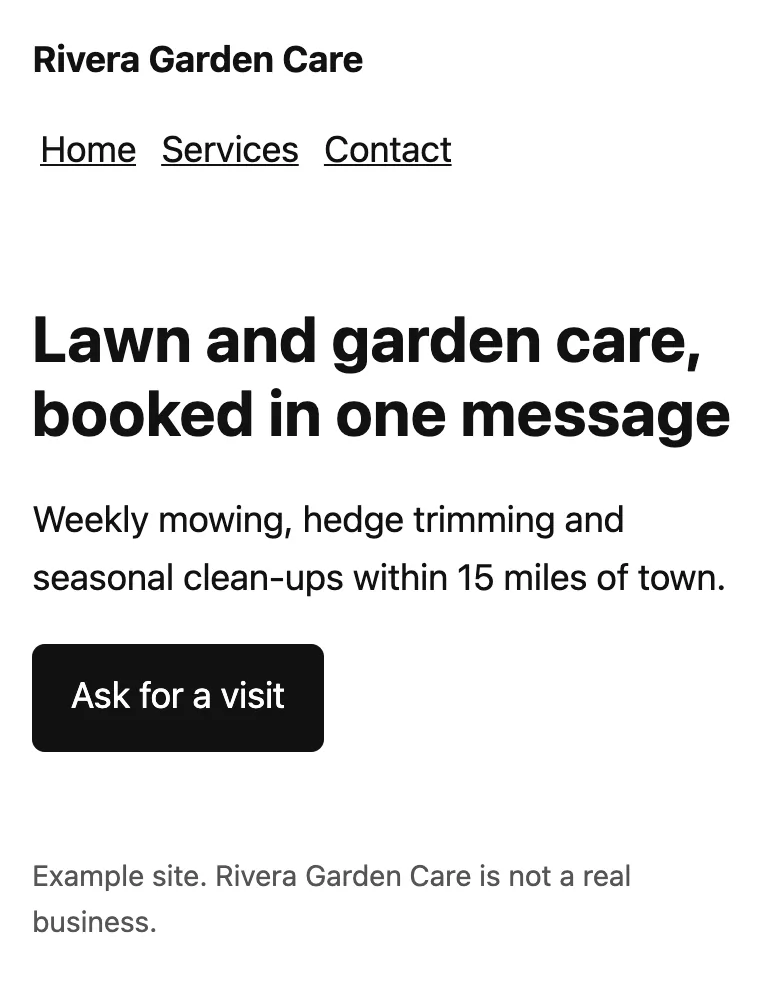
To put numbers on the hand-coded route, on 26 November 2026 we made a site for an invented garden care business, Rivera Garden Care, which says in its own footer that it is not real. It has a home page, a services page, a contact page with an email link and one shared style sheet. We opened the files in a headless Chrome browser set to 390 by 844 pixels.
| What we measured | Result |
|---|---|
| Files | 4 (three HTML pages and one style sheet) |
| Total size, uncompressed | 3,011 bytes |
| The same text compressed together with gzip | 1,029 bytes |
| Requests to load a page | 2 (the page and the style sheet) |
| Page width at a 390 pixel screen | 390, so no sideways scroll |
| JavaScript used | None |
| Images, web fonts, forms | None |
Read the last row carefully. The site is small partly because it leaves things out. Photos will add most of the weight on a real site, and a contact form needs a service to receive it, because a plain file host only sends files. We did not publish this test site, did not time the work and did not test it on a physical phone, so the figures say nothing about speed over a real network.
Four lines did most of the work for phones and accessibility: the viewport tag that tells a phone to use its own width, a maximum text width for comfortable reading, a menu that wraps onto a new line when space runs out and a visible outline on focused links.
| Item | Figure | Source, checked 26 Nov 2026 |
|---|---|---|
| A .com domain | $11.81 | Porkbun's .com page, which says the price stays the same at renewal |
| Wix paid plans | From $17 a month in the US, billed annually, so at least $204 a year | Wix's own from-scratch guide, which says prices vary by location |
| Wix free plan | $0, with a Wix subdomain and Wix branding | Same guide |
| Cloudflare Pages free plan | 500 builds a month, up to 20,000 files per site, 100 custom domains per project | Cloudflare's Pages limits page, last updated 19 November 2026 |
| GitHub Pages | 1 GB published site limit, soft 100 GB monthly bandwidth limit | GitHub's Pages limits page |
For the hand-coded route, a domain plus a free static hosting plan comes to $11.81 for the year before any paid tools. That excludes your time, which is the real bill. GitHub states that Pages is not intended or allowed to be used as free hosting to run an online business or e-commerce site, so check the current terms against what your site does. Our guide to website hosting cost covers the paid options.
If you choose self-hosted WordPress, ask the host about requirements first. WordPress.org recommends PHP 8.3 or newer, MariaDB 10.11 or newer or MySQL 8.4 or newer, and HTTPS support.
If you would like the site designed and built for you, send us the one sentence of purpose and the page list from steps 1 and 2. We quote from that scope, not an hourly rate. Payment is split 40% at the start, 30% when you approve the design and 30% before launch. After the last payment you own the design, copy and code, with the domain, hosting and analytics accounts registered to you. See our web design service or get in touch.
Yes. A hosted builder lets you assemble pages by choosing layouts and typing your text. You still decide the structure, write the content and check that everything works.
It depends on the route. A hand-coded site on a free static host can cost only the domain, $11.81 for a .com at Porkbun on 26 November 2026. A paid builder plan adds a monthly or yearly fee.
Not with a hosted builder, which includes it. For WordPress or hand-written files you choose a host yourself.
You can publish on a free builder plan or a free static host, usually on the platform's own address or with its limits. Read the terms before using a free plan for a business.
If you enjoy it and the site is simple, it can be. If the goal is a working site this month, a builder or a hired studio usually gets there sooner.
Start with home, services or products, and contact. Add an about page, and a privacy page if you collect personal information. This is not legal advice, so check the rules where you operate.
AI tools can draft text, layouts or code. You still need to check facts, test the forms and handle the domain and hosting unless the tool includes them.

Tree service website design for owners: an emergency path, photo-based quote requests, proof of credentials and insurance, and honest line-clearance copy.
A cookie policy for a website: what it must say, how it differs from the banner and the privacy policy, a sample cookie table and a 15 minute way to fill it.
Online store terms and conditions clause by clause: which ones a shop needs, which the FTC limits (shipping, refunds, reviews), and a 10 minute check.