

Case study
A family clinic website that feels like your own doctor, not a hospital
Ellory is a neighbourhood family clinic with two locations, same-week visits and the same doctor each time. We designed its website for Webflow, light first with a dark version from the same source, and put booking a visit on the very first screen.
In short
- What it is
- The website for Ellory, a small family clinic with two neighbourhood locations, designed for Webflow in a light and a dark version.
- Who it is for
- Families and busy adults who want a doctor who remembers them, a visit this week and a clear idea of what they will pay.
- The hard part
- Most clinic sites look either cold and clinical or like a stock photo of a smiling doctor. Neither makes booking feel easy.
- The idea
- Make the clinic feel like a calm room you already know, and let people pick a day and a time before they read a single paragraph.
- The design
- Warm white and cream, one terracotta accent, a soft serif beside a clean sans, square photo frames and small pieces of the patient app on every section.
- Good to know
- The names, times and prices on the page are sample content written for the design, and the photos are representative.
What Ellory is
Ellory is a small family clinic with two locations, Northgate and Riverside. You pick your doctor once and see the same person every time. Visits start at 20 minutes, you can usually get one the same week, and after each visit a plain summary of what you talked about lands in the Ellory app.
The people choosing a clinic like this are parents booking for a child, adults who keep putting off a check-up, and anyone tired of explaining their history to a new face every time.
The problem the site had to solve
- Feel safe without feeling clinical. A health site has to look careful and serious, but white walls and blue icons make a small clinic feel like a hospital.
- Make booking the obvious next step. Most people arrive wanting one thing: a time that suits them. That should not be three clicks away.
- Answer the quiet worries. Who will I see? How long is a visit? What will it cost? Which clinic is open late? Each one needed a clear, honest answer.
- Stay careful with claims. Healthcare has rules. The page talks about how visits work, never about treatment results.
Book a visit before you scroll
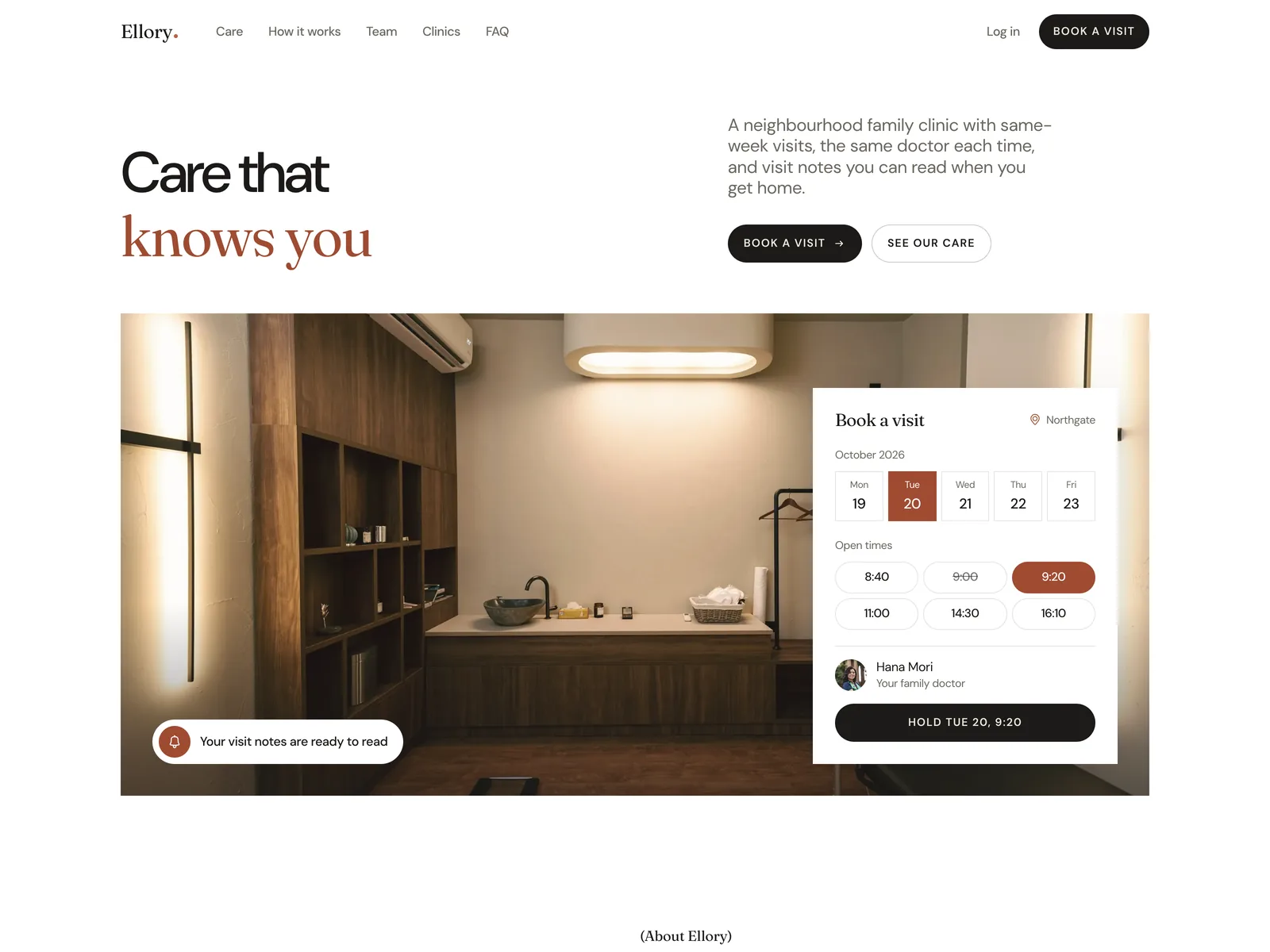
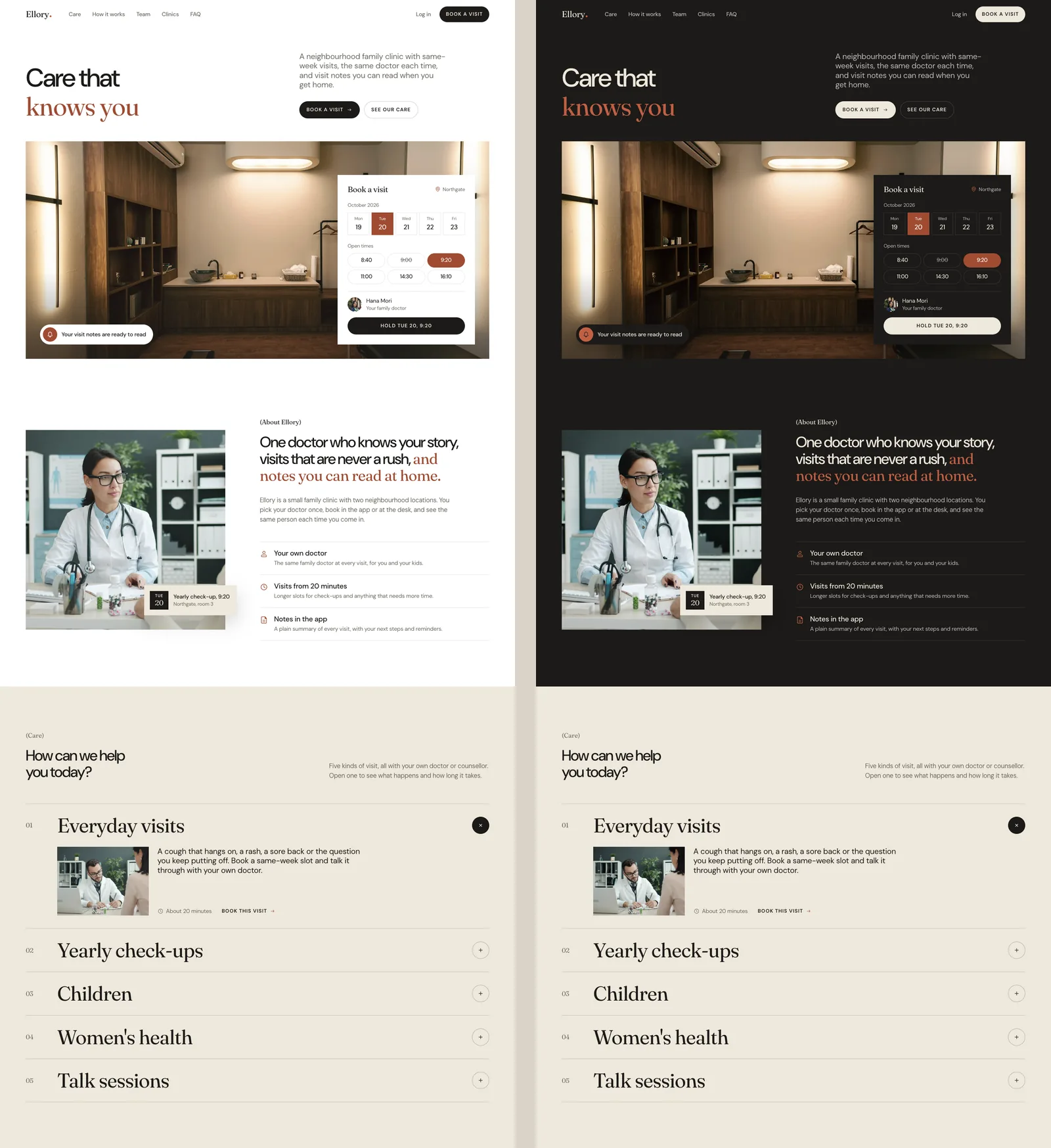
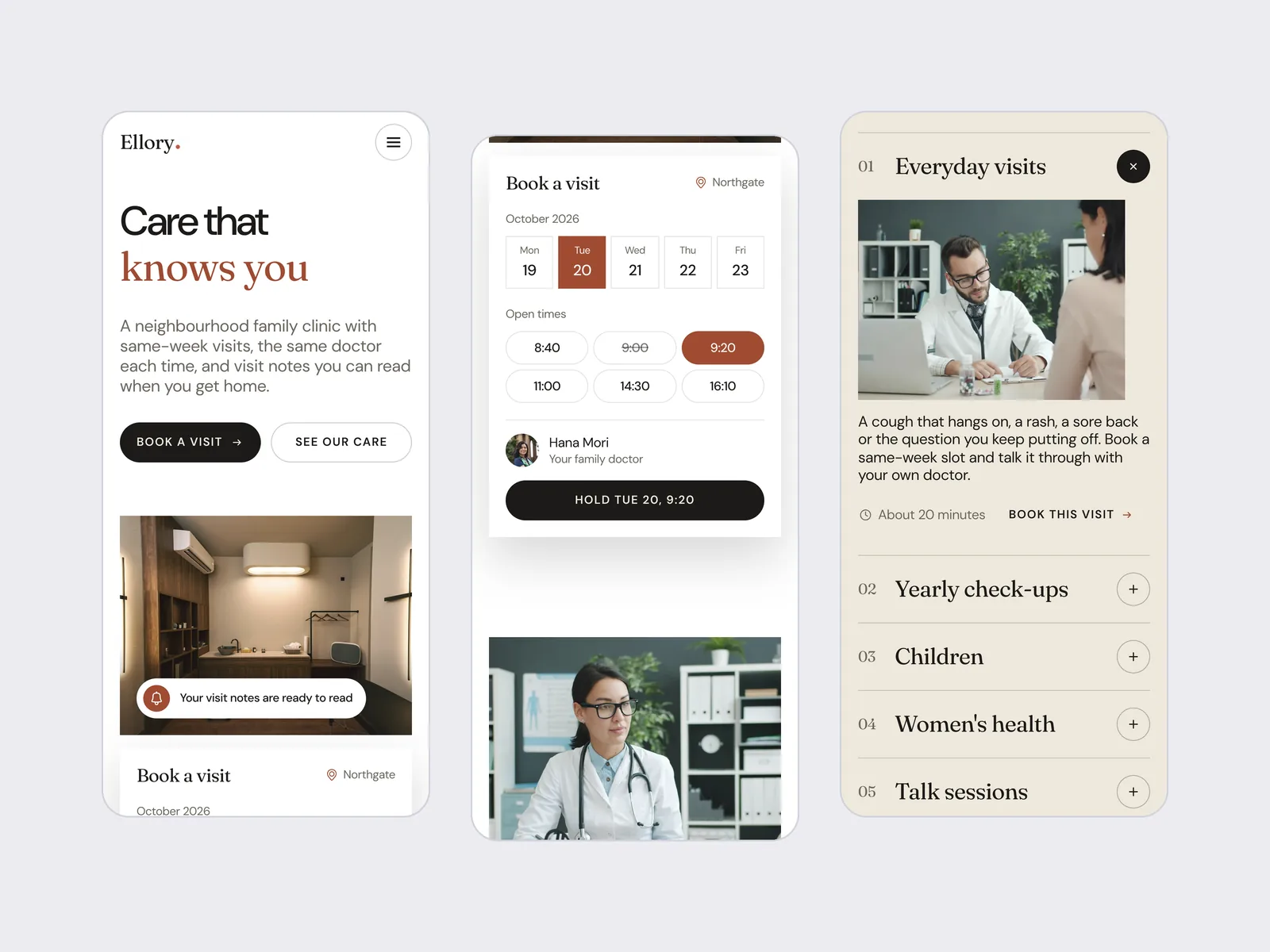
The first screen is a calm consulting room with a booking card on top of it. The headline, Care that knows you, sits beside one short line about same-week visits and the same doctor each time.
The card is not a picture of a form. Pick a day, pick a time, and the button changes to match, for example Hold Tue 20, 9:20. A taken slot is shown greyed out, so the card reads like a real diary. A small note in the corner of the photo says your visit notes are ready to read, a hint of what comes after the visit.
One section, one question
Below the hero, every section answers one question a new patient has, in the order they tend to ask it.
- Who are you? One doctor who knows your story, visits that are never a rush, and notes you can read at home, with a next appointment card on the photo.
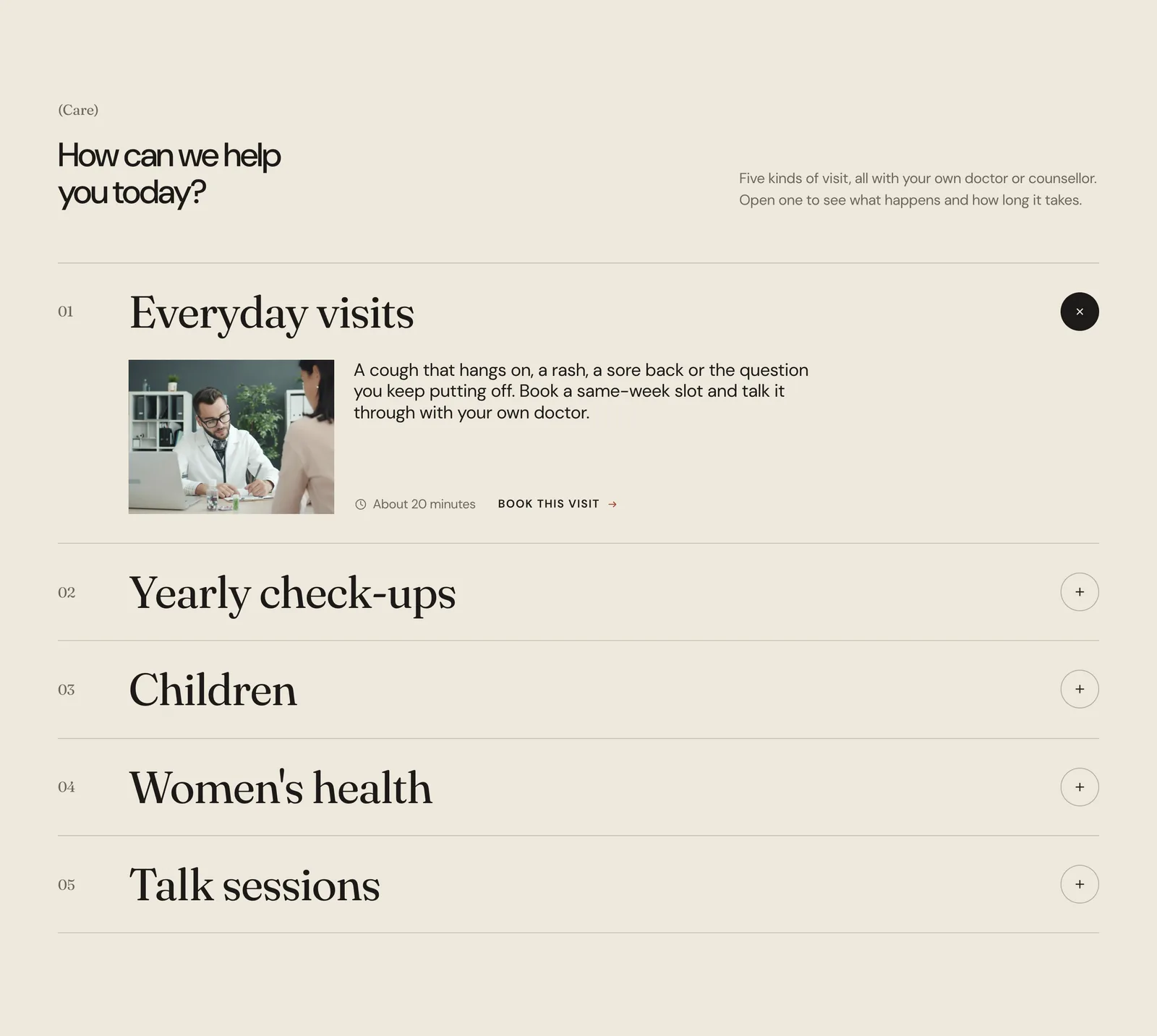
- Can you help with my problem? Five kinds of visit in a list you open one at a time, each with how long it takes and a link to book it.
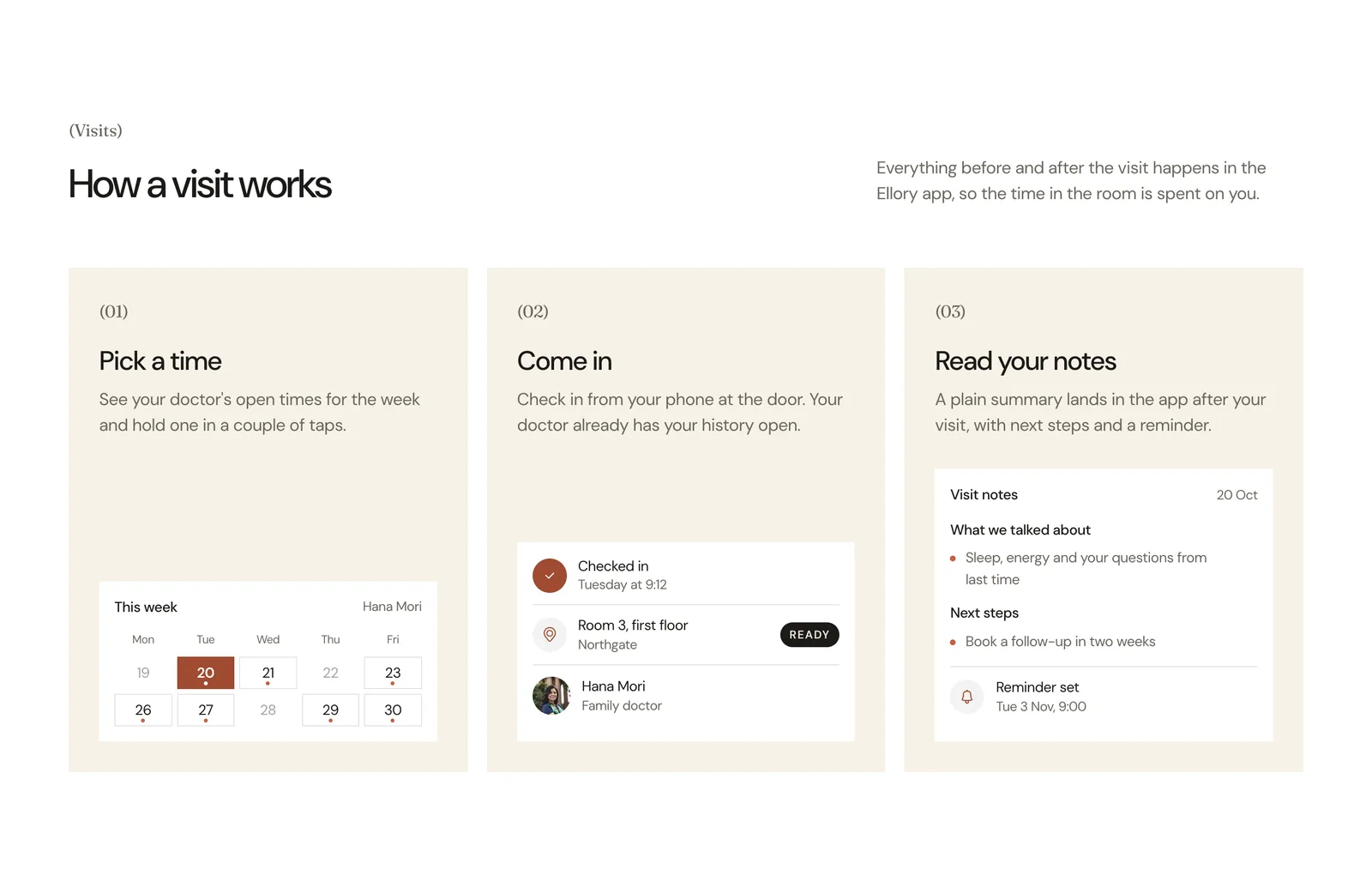
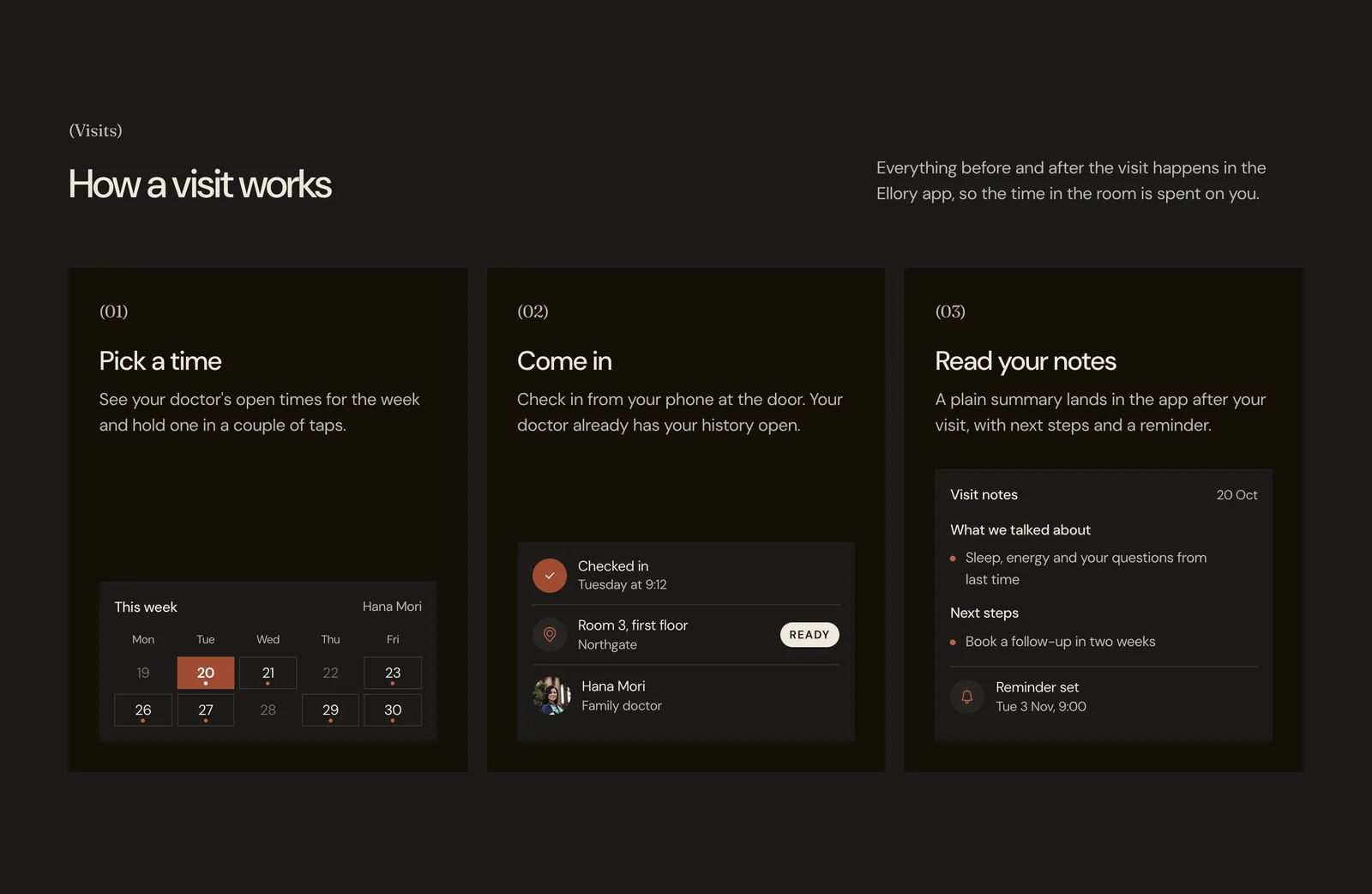
- What happens on the day? Pick a time, come in, read your notes: three steps, each with a small piece of the app.
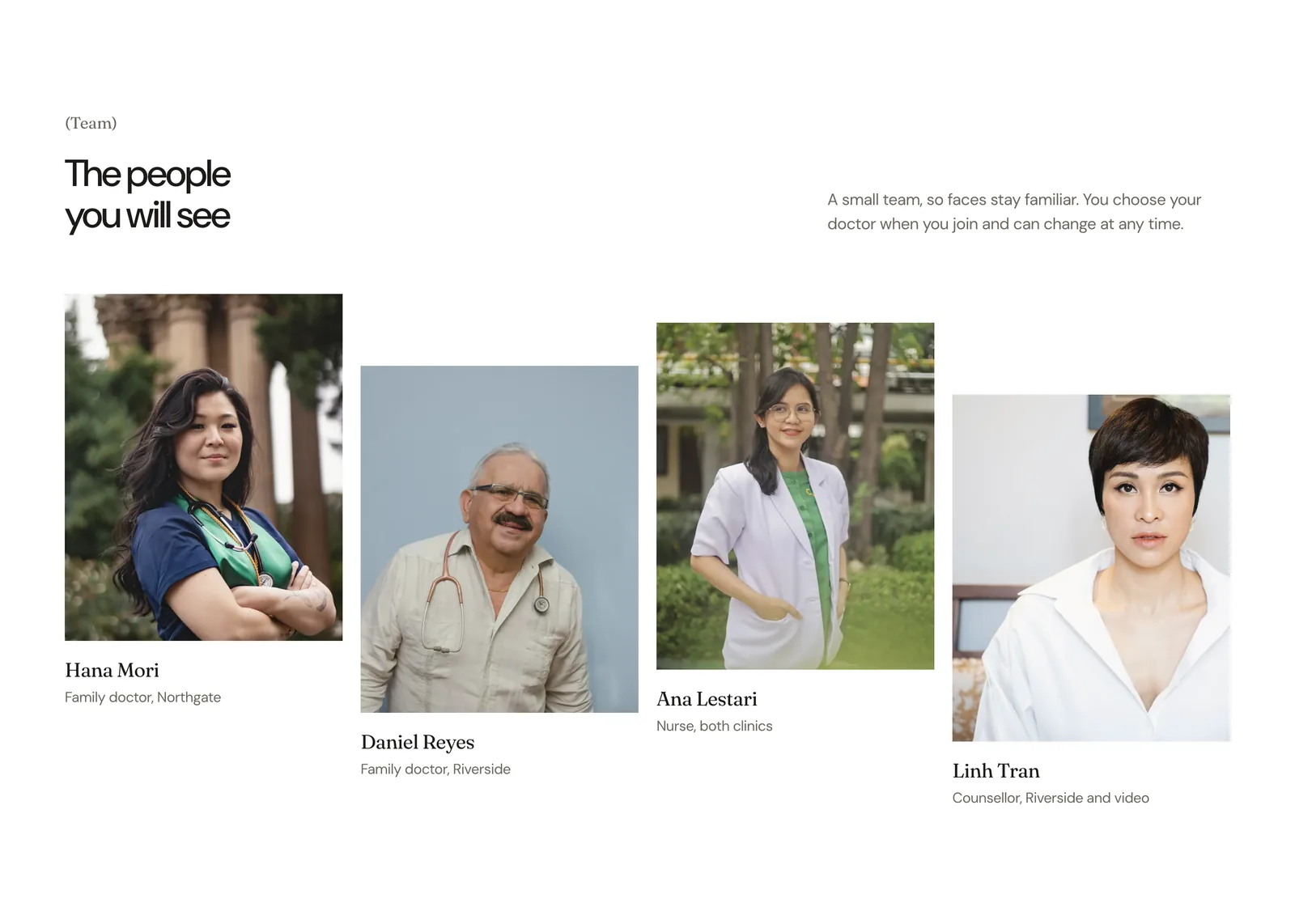
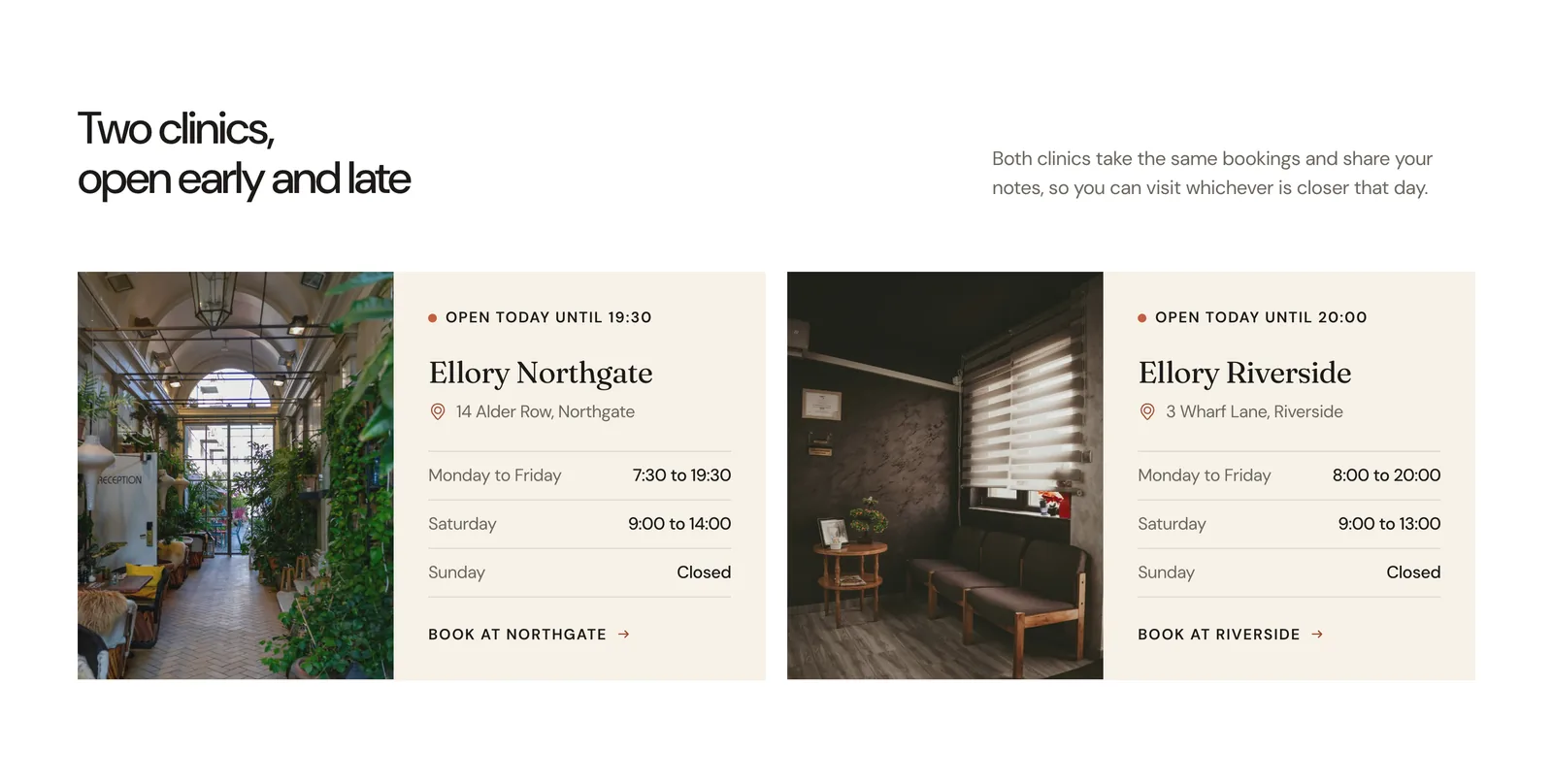
- Who will I see, and where? Four people by name and role, then both clinics with their addresses and opening hours.
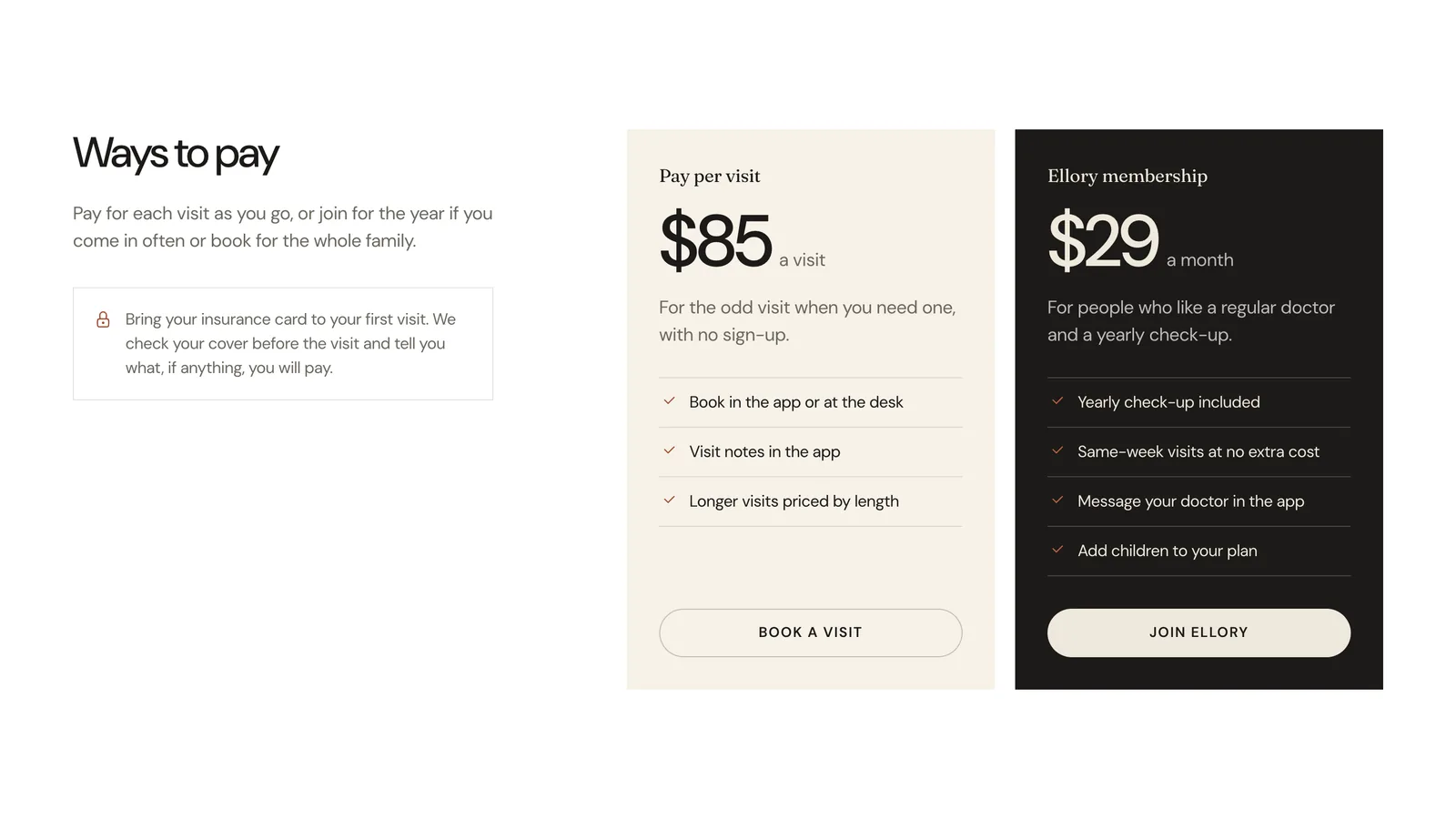
- What will it cost? Pay per visit at $85, or a $29 monthly membership, plus a short note about bringing your insurance card.
The brand system
The palette is small and warm. Near black ink, a cream for bands and cards, white for the page, and one terracotta for the moments that matter: the picked day and time, the second line of the headline and the clinic’s open-today dot.
Two typefaces share the work. DM Sans carries the headings, buttons and body text. Fraunces, a soft serif, is saved for the human parts: visit names, people’s names, the clinic names and the closing line. Photo frames and cards are square-cornered, and only the buttons are fully round, so it is always clear what can be pressed.
Photography follows the same rule. Every photo carries the same gentle warm tone, built into the image files, so stock photos from different places read as one clinic.
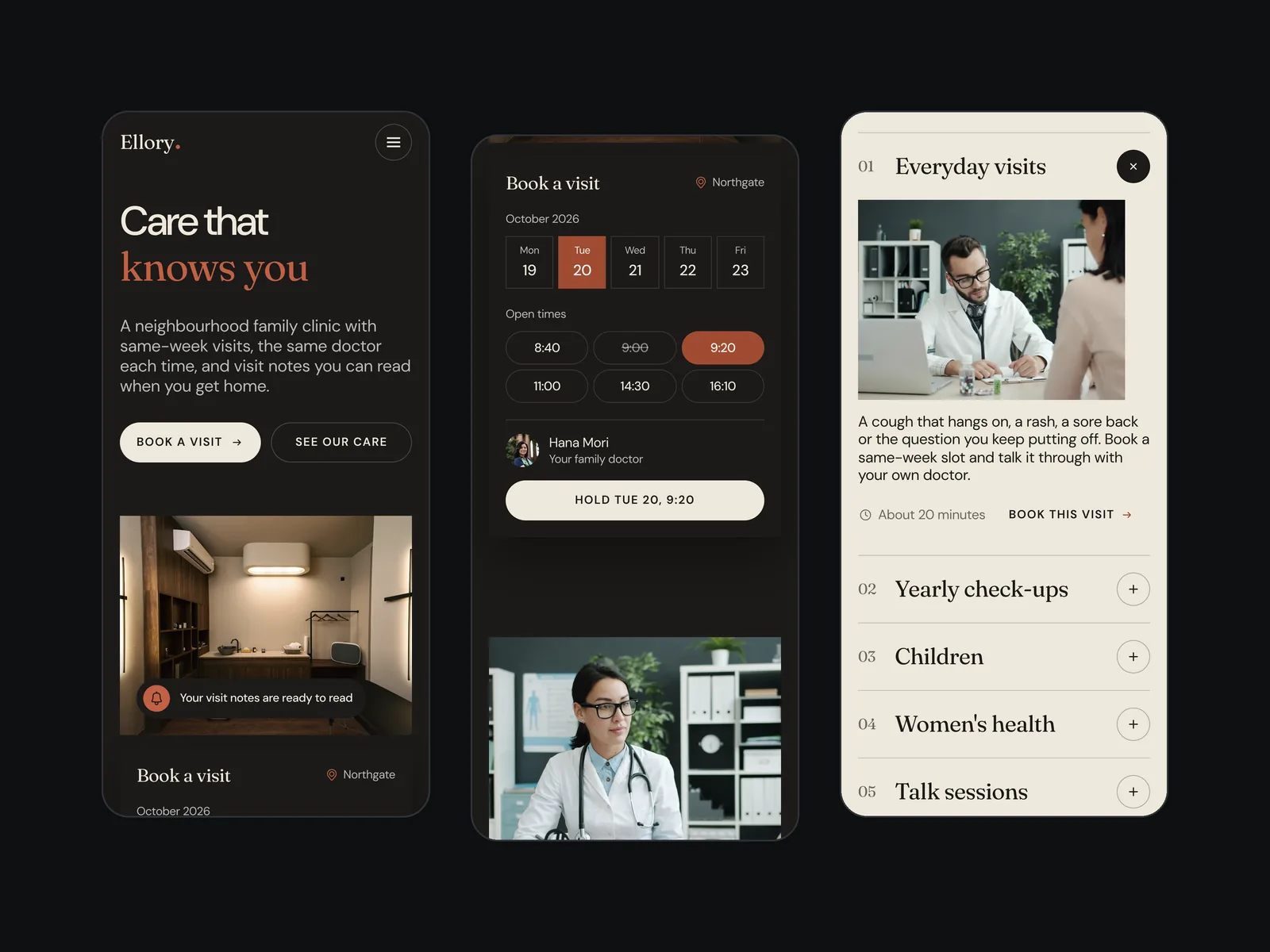
Light first, dark from the same source
The light version is the main one. Clinics are places people visit in daylight, and a white page with cream bands feels open and clean without feeling cold. The dark version is generated from the same file, so a change to the layout reaches both themes at once.
A few things change on purpose. On white, the terracotta accents turn a shade deeper so they stay easy to read, the buttons become ink with cream text, and the membership card flips to ink so it still stands out. The closing band and the footer stay dark in both versions, so the page always ends on the same quiet moment.
Motion that stays calm
A clinic should never feel rushed, so the page moves slowly and only when it has a reason to.
- One opening moment. The headline rises line by line, the room settles into its frame, the booking card arrives and a time is picked for you.
- One quiet loop. The note on the hero photo changes every few seconds, and the old line fades out fully before the new one fades in.
- Hover that responds. A thin border highlight follows the pointer around each card, and the main buttons lean gently toward it.
- Calm by request. For visitors who ask their system for reduced motion, every animation is off and the page is complete without it.
Fast and easy to read
Many patients visit a clinic site on a phone, sometimes on a slow connection, so speed and readability were part of the design from the start.
- Light to load. The page loads in seven requests and about 310 KB. The typefaces and animation code are served from the site itself, with nothing to wait for from other servers.
- Steady while loading. The photo tone is built into the files instead of being calculated as you scroll, and nothing on the page shifts as it loads.
- Easy to read. Every visible line of text passes the WCAG AA contrast standard, in both themes, on desktop and on phones.
Built for phones, not squeezed onto them
On a phone the booking card moves below the photo at full width, so every day and time is big enough to tap. The care list keeps its large serif names, the team and clinic cards stack into one column, and the navigation folds into a menu.
Ready for Webflow
Ellory was designed for a Webflow build from the first section. Class names follow the Finsweet Client-First system, each section stands on its own so it can become a Webflow component, and the colours, type and spacing sit in a small set of shared variables. The two themes map to a single variable swap, and the animations are written with GSAP, the same engine behind Webflow Interactions.
Questions
What people ask about this project.
Can you design a clinic website like this for our practice?
Yes. We start from how your patients actually book: the visit types you offer, your opening hours, your locations and the questions your front desk answers every day. The page is then built around making the next step easy.
We design for Webflow by default, and the design system is set up so your team can add pages, people and clinics without breaking the look.
Does the booking card connect to a real booking system?
On this design the card shows every state, picking a day, picking a time and a taken slot, without a booking system behind it. On a live project we connect it to the system you already use, or link to it, and keep the same look.
Why is the light version the main one?
A clinic is a daytime place, and a white page with cream bands feels open and clean. The dark version comes from the same source file, for brands that want a calmer evening feel or a second look for campaigns.
How do you handle the rules around healthcare websites?
We write about how visits work, opening hours and prices, and we leave out claims about treatment results. Staff are shown with their names and roles, and any badges or partner logos go on the page only when the clinic can back them up.
Can it be built on a platform other than Webflow?
Yes. We design for Webflow first, and we also build on Framer, WordPress and Shopify. The structure, components and motion carry over to any of them.
Next case study